

Jakarta, teckknow.com – UML Diagrams play a central role in software design and technical communication because they provide a structured visual language for describing systems, processes, components, and interactions. In projects where complexity grows quickly, diagrams help teams move from vague discussion to shared understanding. Rather than relying only on long verbal explanations or scattered documentation, UML offers a way to make architecture, workflows, and system behavior visible and easier to discuss.
What makes UML Diagrams especially useful is their ability to bridge multiple perspectives. Developers, analysts, architects, testers, and stakeholders can use them to examine how a system is structured, how data moves, and how components interact over time. In practical terms, UML helps reduce the number of meetings where everyone nods confidently while imagining completely different systems.
Understanding UML Diagrams
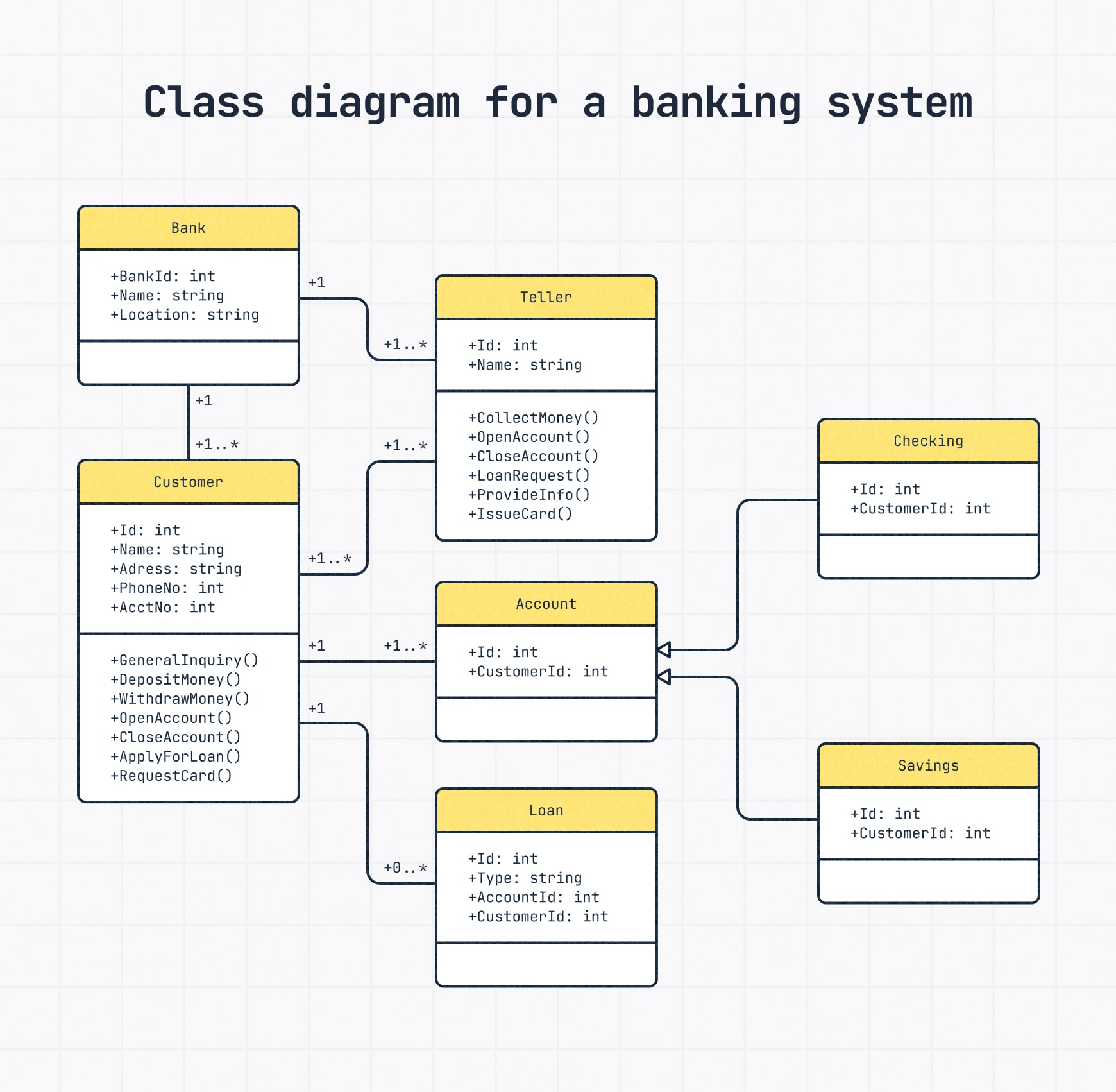

To understand their value, it helps to define what UML Diagrams are and why they remain relevant in software and system design.
Core meaning
UML Diagrams commonly refer to:
- Standardized visual models used in software engineering
- Diagrams that represent system structure and behavior
- Tools for documenting design decisions and workflows
- Techniques for improving communication across technical teams
- A modeling language that supports analysis, planning, and development
These qualities make UML an important part of structured system thinking.
Why it matters
Its importance comes from the way it helps teams:
- Clarify system requirements and boundaries
- Visualize architecture and relationships
- Describe interactions and process flow
- Improve collaboration between technical and nontechnical participants
- Reduce ambiguity in design communication
This gives UML Diagrams both technical and organizational value.
Main Types of UML Diagrams
UML includes several diagram types, each suited to different aspects of system modeling.
Structural diagrams
Structural diagrams focus on the static parts of a system. Common examples include:
- Class diagrams
- Component diagrams
- Deployment diagrams
- Object diagrams
- Package diagrams
These diagrams help teams understand system organization, dependencies, and architecture.
Behavioral diagrams
Behavioral diagrams focus on how a system behaves over time. Common examples include:
- Use case diagrams
- Sequence diagrams
- Activity diagrams
- State machine diagrams
- Communication diagrams
These diagrams are useful for showing workflows, user interactions, and runtime behavior.
Why different diagram types matter
Different diagram types matter because they:
- Support multiple design viewpoints
- Help teams match the diagram to the problem being explained
- Make communication more focused and effective
- Improve documentation quality across project stages
This is one reason UML remains useful in both simple and highly complex projects.
Visual Modeling for Clear Communication
The main strength of UML Diagrams is their ability to turn abstract technical concepts into understandable visual models.
How UML improves communication
UML helps communication by:
- Providing a common visual standard
- Making relationships easier to understand
- Revealing gaps or inconsistencies in design
- Supporting clearer handoffs between teams
- Encouraging more structured system discussions
This makes UML valuable not just for architects, but for anyone involved in system planning or review.
Practical communication benefits
In practice, UML Diagrams help teams:
- Explain software design more clearly
- Review workflows before implementation
- Train new team members more effectively
- Align technical planning with business needs
- Reduce confusion during development and maintenance
When used well, UML becomes less about drawing boxes and more about making ideas survivable in group conversation.
Main UML Benefits Overview
Below is a concise overview of the major strengths associated with UML Diagrams.
| Area | Main Benefit | Why It Matters |
|---|---|---|
| System Visualization | Makes abstract designs visible | Improves understanding |
| Communication | Creates a shared modeling language | Reduces ambiguity |
| Documentation | Records structure and behavior clearly | Supports maintenance |
| Analysis | Helps identify gaps and dependencies | Improves planning |
| Collaboration | Connects technical and business viewpoints | Strengthens alignment |
Together, these benefits explain why UML Diagrams continue to be widely used in software and systems work.
Why UML Diagrams Continue to Matter
UML Diagrams continue to matter because software systems are rarely simple, and complexity needs structure to remain manageable. Even in agile environments where lightweight documentation is preferred, visual models still provide a fast and effective way to communicate system ideas, interactions, and architecture.
Lasting significance
It remains important because it:
- Supports clearer software design communication
- Helps teams visualize both structure and behavior
- Reduces misunderstandings during development
- Improves documentation and review quality
- Provides a standardized modeling approach across projects
Broader perspective
UML Diagrams show that visual thinking remains essential in technical work. By helping teams translate complex systems into shared representations, UML continues to serve as a practical tool for planning, explaining, and improving software design.
Key Takeaways
UML Diagrams support clear system communication by providing visual modeling techniques that describe structure, behavior, workflows, and architecture in a standardized and understandable way.
Main lessons
- UML Diagrams are valuable tools for software design and technical communication
- Different diagram types serve different structural and behavioral purposes
- UML improves clarity, collaboration, and documentation quality
- Visual models help reduce ambiguity in complex systems
- Its long term value comes from making technical ideas easier to share and refine
Final perspective
The key takeaway is that UML Diagrams are not just documentation artifacts. They are practical communication tools that help teams think more clearly, collaborate more effectively, and design systems with greater shared understanding.
Explore our “”Technology“” category for more insightful content!
Don't forget to check out our previous article: API Security: Safeguarding APIs with Authentication, Authorization, and Threat Protection

