
JAKARTA, teckknow.com – Proprietary Software: Understanding Commercial Technology Solutions isn’t just some jargon thrown around in tech meetups—it’s something I’ve wrestled with since the early days of my career. If you’ve ever gotten lost in licensing terms or wondered why people pay for what looks like a basic tool, hey, you’re not alone.
In the rapidly evolving landscape of technology, businesses often face the crucial decision of whether to adopt proprietary software solutions. Proprietary Software refers to software that is owned by an individual or a company, which restricts its use, modification, and distribution. In this guide, we’ll explore the advantages and disadvantages of proprietary software, how it impacts business decisions, and the key considerations for making informed choices.
What Is Proprietary Software?
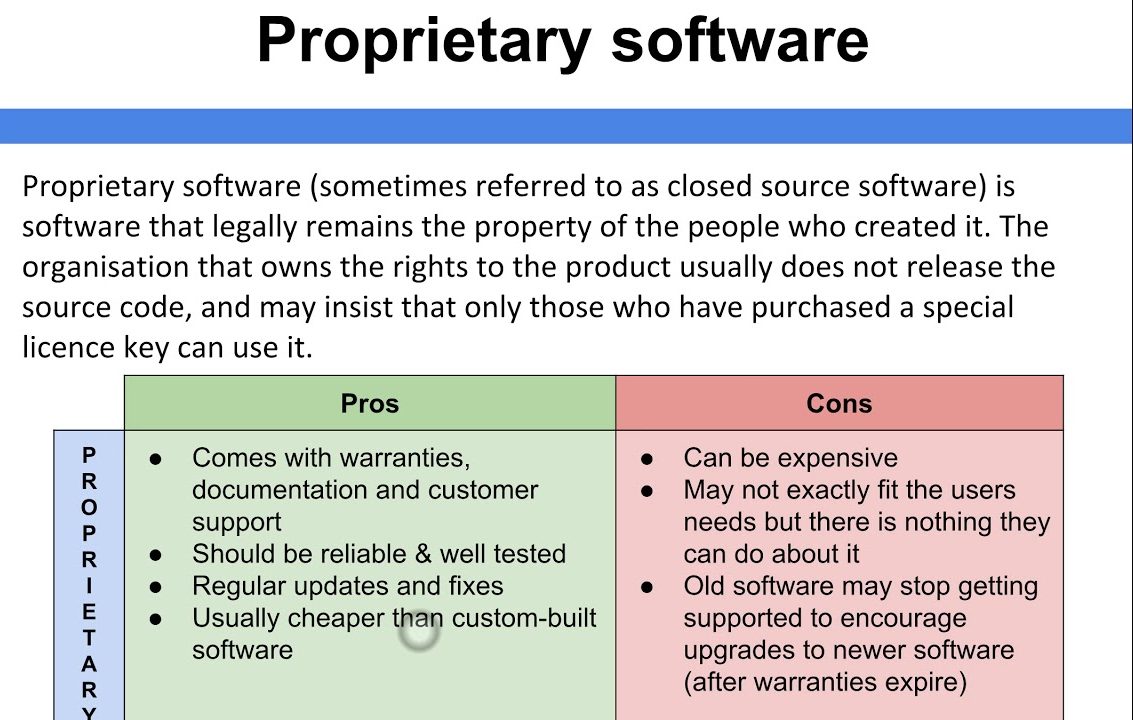

Proprietary software is defined by the following characteristics:
- Ownership: The software is owned by a specific entity (individual or organization) that retains exclusive rights over its use and distribution.
- Licensing: Users must purchase a license to use the software, and the terms often limit how they can use or modify it.
- Support and Updates: The owning entity typically provides support, updates, and maintenance, ensuring that the software remains functional and secure.
- Closed Source: The source code is not available to the public, preventing users from modifying or redistributing the software.
Advantages of Proprietary Software
- Enhanced Support
• Users receive dedicated customer support and regular updates from the vendor, ensuring reliability and security. - User-Friendly Interface
• Designers create proprietary software with user experience in mind, making it easier for employees to adopt and utilize effectively. - Integration Capabilities
• Many proprietary solutions offer seamless integration with other commercial products, enhancing overall functionality. - Security
• With controlled access to the source code, proprietary software can provide robust security measures, reducing vulnerabilities. - Feature-Rich Solutions
• Vendors often invest significantly in research and development, leading to innovative features and enhancements that meet specific business needs.
Disadvantages of Proprietary Software
- Cost
• Licensing fees can be substantial, especially for larger organizations or those requiring multiple licenses. - Vendor Lock-In
• Businesses may become dependent on a vendor’s ecosystem, making it difficult to switch to alternative solutions without incurring additional costs. - Limited Customization
• Users have little control over the software’s features and functionality, which may not align perfectly with unique business processes. - Lack of Transparency
• The closed-source nature means users cannot inspect or modify the code, which can be a concern for organizations prioritizing transparency. - Potential for Obsolescence
• If a vendor discontinues support or goes out of business, users may face challenges in maintaining or upgrading the software.
Key Considerations for Choosing Proprietary Software
- Assess Business Needs
– Identify specific requirements and objectives that the software needs to address. - Evaluate Total Cost of Ownership
– Consider not only the initial licensing fees but also ongoing costs for support, training, and potential upgrades. - Research Vendor Reputation
– Investigate the vendor’s track record, customer reviews, and support options to ensure reliability. - Check Integration Options
– Ensure that the proprietary software can integrate with existing systems and tools to avoid data silos. - Explore Trial Options
– Many vendors offer free trials or demos, allowing businesses to test functionality and usability before committing.
Examples of Proprietary Software
- Microsoft Office Suite: A widely used productivity suite that includes applications like Word, Excel, and PowerPoint, known for its user-friendly interface and extensive features.
- Adobe Creative Cloud: A collection of software for graphic design, video editing, and web development, offering powerful tools like Photoshop and Illustrator.
- Salesforce: A leading customer relationship management (CRM) platform that provides businesses with tools for sales, marketing, and customer service.
- SAP ERP: An enterprise resource planning software that integrates various business processes, providing comprehensive solutions for large organizations.
Alternatives to Proprietary Software
- Open Source Software: Software with publicly available source code that allows users to modify and distribute it freely. Examples include Linux, Apache, and LibreOffice.
- Freemium Models: Basic versions of software that are free to use, with premium features available for a fee (e.g., Trello, Slack).
- Custom-Built Solutions: Tailored software developed specifically for a business’s unique needs, though this can be costly and time-consuming.
Conclusion
Proprietary software offers businesses robust, feature-rich solutions with dedicated support; however, it also presents challenges, such as cost and vendor lock-in. By carefully evaluating the advantages and disadvantages, assessing business needs, and considering alternatives, organizations can make informed decisions that align with their strategic goals. Ultimately, understanding the nuances of proprietary software empowers businesses to leverage technology effectively for sustained growth and success.
Boost Your Proficiency: Learn from Our Expertise on Technology
Don’t Miss Our Latest Article on Trust Flow: Measuring Website Authority and Quality for SEO Success!

